Before changing a marketing channel, check why the inquiries it brings are being declined. The Law Firm Sheets declined inquiry analysis workbook helps you classify recorded declines and review their distribution by channel, reason and requested practice area.
Use it to prepare a focused discussion with the supervising lawyer about possible mismatches between marketing and intake. This is an administrative Excel resource, not legal advice or a practice management service, and its counts describe recorded declined inquiries—not all leads.
Where this workbook helps
- Focus marketing discussions on recorded decline patterns rather than isolated recollections.
- Keep classification labels consistent with dropdown choices for channels, reasons and requested practice areas.
- Separate incomplete or duplicate-ID records from the records eligible for reporting.
- Use adjustable sample-size and reason-share thresholds to decide which channels need closer examination.
What is in the file
How to get started
1. Prepare a working copy
Save a copy before entering firm records. Rows 2–11 of Declined Inquiries contain fictional examples, including fictional staff labels. Clear their input values in columns A–G before preparing a live report, but preserve the Record Status formulas in column H. Use non-identifying inquiry IDs rather than names or case narratives.
2. Set the reporting assumptions
On Lists and Settings, confirm Reporting Start, Reporting End, Minimum Declines for Review, Selected-Reason Review Threshold and Selected Reason. The initial dates roll with today. Set fixed dates if you need a repeatable reporting period, and confirm that the start is not after the end.
3. Enter and review each declined inquiry
Complete Inquiry ID, Declined Date, Marketing Channel, Requested Practice Area, Primary Decline Reason, Reviewer Label and Review State on Declined Inquiries. Use one row per declined inquiry and one primary reason. Enter dates as Excel dates displayed in MM/DD/YYYY format, and use the dropdown labels where provided.
4. Resolve exceptions and inspect the report
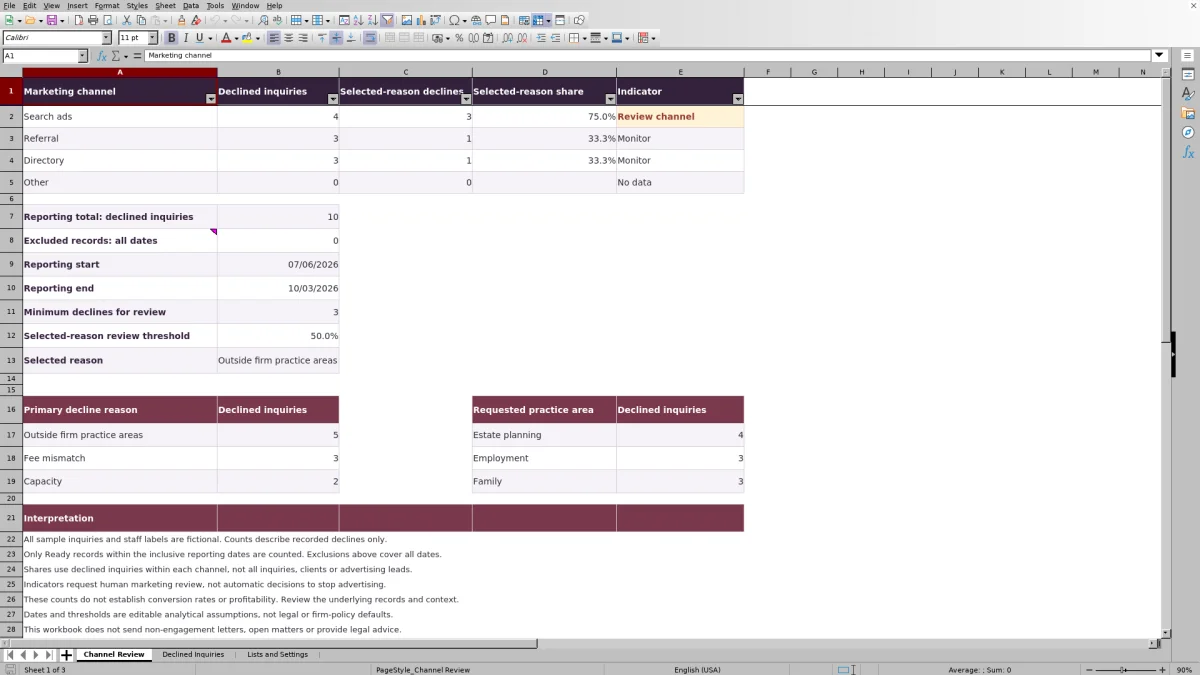
Check Record Status for Needs review or Check duplicate before relying on the totals. Then open Channel Review to inspect channel counts, Selected-reason share and Indicator. Only Ready records within the inclusive reporting dates qualify for the report; check the underlying entries before recommending a marketing change.
Read the share as a pattern among declines
Selected-reason share answers a narrow question: of the eligible declined inquiries recorded for this channel, what portion has the reason selected on Lists and Settings? The calculation divides Selected-reason declines by Declined inquiries for that channel.
The denominator is declined inquiries, not all inquiries. A high share for Outside firm practice areas may justify examining the channel's messaging or targeting. It does not show that most people arriving through that channel are unsuitable, because accepted inquiries and other leads are not part of this denominator.
Before making a budget decision, compare the findings with your separate records of total inquiries, retained matters and marketing costs. This workbook does not establish a conversion rate or profitability. Its indicator identifies a question for review, not a decision to stop advertising.
Choose dates that support a repeatable review
The initial Reporting Start is today minus 89 days, and Reporting End is today. Because both endpoints are included, this creates a rolling 90-day reporting window. The fictional sample dates remain fixed, so their inclusion can change as time passes.
For a monthly or quarterly handoff, replace the rolling dates with the intended fixed period in Lists and Settings. Confirm the displayed Reporting start and Reporting end on Channel Review before distributing the file. The entry controls require reporting dates no later than today.
Excluded records: all dates has a different scope from the reporting totals. It counts records marked Needs review or Check duplicate across the input range, including records outside the selected period. Do not subtract that number from the period total or assume it describes only the current reporting window.
Keep a dated copy when you finalize a review. Changing dates, classifications or thresholds later can change the report; saving a copy is a manual preservation step, not an automatic audit trail.
Fictional example: a channel flagged for review
For a controlled example reviewed on or after 10/02/2026, use a reporting period of 09/29/2026 through 10/02/2026. Assume the only eligible Search ads entries are the four fictional sample inquiries FICT-001 through FICT-004. Each has a unique ID, complete inputs, a numeric Excel date and a Review State of Reviewed.
Three of those inquiries have Outside firm practice areas as their Primary Decline Reason; the fourth has Capacity. With Outside firm practice areas selected, the channel has 4 declined inquiries and 3 selected-reason declines. The calculation is 3 ÷ 4 = 75.0% selected-reason share.
Using a Minimum Declines for Review of 3 and a Selected-Reason Review Threshold of 50.0%, the verified indicator logic returns Review channel: the count meets the minimum and the share meets or exceeds the threshold. These are editable analytical assumptions, not recommended firm standards.
The result supports reviewing how Search ads describes the firm's services. Next, inspect the requested practice areas and the underlying classifications. Do not conclude that the channel is unprofitable or that its other inquiries are unsuitable; this example covers only the recorded declines.
Troubleshooting missing counts and unexpected indicators
- Needs review: Check for a missing input in columns A–G, a date stored as text, or a Review State other than Reviewed. Correct the record from the source information rather than typing over Record Status.
- Check duplicate: The same Inquiry ID appears more than once in rows 2–101. Determine whether the entries represent one inquiry entered twice or separate inquiries assigned the same ID. Correct the underlying issue; duplicate detection takes precedence over the other status checks.
- Ready but not counted: Check the Declined Date against the reporting period and compare Marketing Channel with the current list label. Ready does not certify pasted category values, so an unrecognized label can escape the status check yet fail to match a summary category.
- Blank share and No data: No qualifying declines were counted for that channel. The blank is not a 0% share. Check dates, statuses and channel labels before treating it as an absence of recorded activity.
- Small sample: The channel has qualifying records but fewer than Minimum Declines for Review. This indicator takes precedence over the share threshold, even if the selected reason accounts for every counted decline.
- Monitor: The channel meets the minimum count but its selected-reason share is below the threshold. That does not establish that the channel is suitable; it only describes this test.
The cells are unprotected. If a calculated result is missing or shows Check counts, inspect whether formulas were overwritten and compare them with a clean copy. Do not replace an unexpected result with a manually typed total.
Keep reasons and requested practice areas distinct
Requested Practice Area describes what the inquiry concerned, not which services your firm offers. Primary Decline Reason describes the recorded reason for declining it. Keeping those fields separate helps you distinguish a service mismatch from a capacity or fee issue.
Use the reason and practice-area summaries to identify where to inspect the underlying records. To examine a particular combination, filter Declined Inquiries by the relevant fields. The separate summary blocks should not be treated as a channel-by-practice-area cross-tabulation.
Where several reasons could apply, have the firm decide how staff should choose the primary one. The workbook stores one primary reason per inquiry; it does not weigh competing reasons or make the classification for you.
Keep list labels nonblank and unique. If you rename a category on Lists and Settings, inspect and reconcile records using the old wording. Simply changing the list does not establish that earlier entries now use the new label.
Plan for capacity and a clear handoff
The supported record range is rows 2–101 on Declined Inquiries. Rows 12–101 are initially available beneath the fictional samples; clearing the sample inputs makes their rows available too. Rows beyond 101 are not covered by the supplied status formulas and reporting ranges.
The controlled lists also have fixed scope: four marketing channels, three decline reasons, three requested practice areas and two reviewer labels. Use the existing list cells. Adding categories beyond them requires coordinated updates to validation and summaries; typing a new label below a list is not sufficient.
If your volume or classification needs exceed those ranges, decide whether to maintain a carefully tested expanded workbook or use a different recordkeeping process. Before a handoff, identify the working copy, its reporting period and who will examine unresolved records. Record the resulting marketing decision in your firm's usual decision record; this workbook does not provide a dedicated next-action field or send notifications.
Compare this workbook with a blank spreadsheet
A blank spreadsheet can work for an occasional review, particularly when your categories change frequently. This workbook offers an established structure when your records fit its scope and you want repeatable counting rules.
| Method | Entry and classification | Reporting and interpretation | Maintenance and scope |
|---|---|---|---|
| Law Firm Sheets workbook | Defined inquiry fields, dropdown lists and completion and duplicate-ID status checks. | Inclusive date-window counts, selected-reason shares and indicators based on editable assumptions. | Supplied formulas cover 100 record rows and fixed category ranges; expansion requires updates. |
| Blank spreadsheet | You design the columns, category conventions and any validation or review checks. | You build and verify filters, counts, denominators and any threshold logic. | You choose the scope but must maintain the structure and test calculations as it changes. |
Choose this workbook if its fixed categories and record capacity fit your review and you want the supplied formulas. Choose a custom spreadsheet if your process needs a different structure and someone can maintain and test it. Neither approach replaces checking source records or exercising judgment about marketing changes.
Frequently asked questions
Does the workbook send non-engagement letters or open matters?
No. It analyzes recorded declined inquiries. It does not send non-engagement letters, open matters or manage those separate intake tasks. Complete any required communication through your firm's established process.
Does Reviewed mean the inquiry has passed a conflict check?
No. Reviewed records a user's classification review. It does not mean conflict clearance or certify professional judgment. The calculated Ready status checks completion, a numeric date, the Reviewed state and duplicate IDs—not whether the underlying decision was correct.
Should I enter client names or matter details?
Use non-identifying inquiry IDs and administrative classifications. The fictional examples use IDs such as FICT-001, not client identities. One row represents one declined inquiry, not a client, opened matter or invoice; do not add privileged narratives to explain the classification.
Can I analyze a different decline reason?
Yes. Change Selected Reason on Lists and Settings to a reason in the existing list. The selected-reason counts, shares and channel indicators then reflect that choice. Save the prior report if you need to preserve the earlier analysis; the channel display evaluates one selected reason at a time.
Does the report include charts?
No. The verified workbook presents worksheet summaries, counts, percentages and text indicators rather than charts. For a review meeting, use Channel Review alongside the filtered underlying records so the discussion stays tied to the entries being counted.
Editorial coverage

Audra PembrokeBilling and finance content

Graham ElleryPractice administration content