When a vendor reports a service attempt, record what happened, identify any outstanding evidence and check whether attorney review still needs attention. The Law Firm Sheets service of process tracker is an Excel workbook for keeping those administrative tasks together.
Use it to record instructed attempts and review a prioritized follow-up summary. It is an administrative resource, not legal advice or a practice management service. A vendor report or logged review does not establish valid service.
Where this workbook helps
- Keep each instructed attempt tied to a matter ID, assigned paralegal and vendor label.
- Identify records that need missing information before relying on their follow-up status.
- Use elapsed calendar days to decide when to request outstanding vendor evidence.
- Separate evidence follow-up from recorded attorney review during an office handoff.
What is in the file
How to get started
1. Set the reporting assumptions
Open Settings and enter the As-of date in B2. Set the Evidence follow-up threshold (calendar days) in B3 to the firm's chosen interval. The reporting date does not advance automatically, so update it before each review.
2. Record an instructed attempt
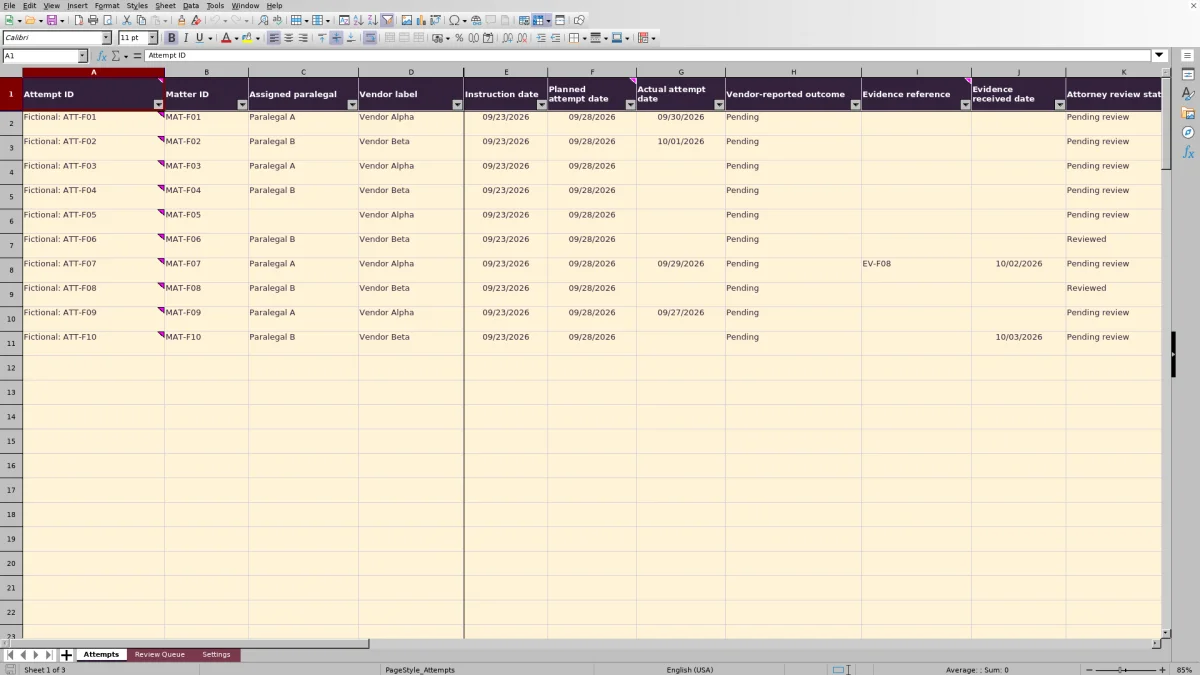
In Attempts, use one row for one attempt involving one matter and one vendor. Enter a unique text Attempt ID, a matter ID and the assigned labels. Complete the instruction, planned attempt, outcome, review status and review-by fields. Planned attempt dates and review-by dates must be independently supplied and verified by the firm; the workbook does not calculate court-rule deadlines.
3. Update the evidence and review record
Enter Actual attempt date when known. When evidence arrives, record its plain-text Evidence reference and Evidence received date. When a review has actually been performed, update Attorney review status and enter Attorney review date and Reviewing attorney. Leave the formulas in columns O–Q intact.
4. Work through the follow-up categories
Check Review Queue, then filter Attempts by the exact Follow-up indicator you want to address. Correct missing inputs first, inspect the underlying dates and evidence fields, and arrange any vendor or attorney follow-up through your firm's usual process. The workbook displays indicators; it does not send messages.
Choose a reporting date before interpreting the queue
The As-of date on Settings is the reference point for both evidence waiting time and overdue review indicators. Treat it as the date of your administrative review, not as a live clock. If it remains unchanged, the workbook continues assessing records against that older date.
The evidence threshold accepts a whole number from 1–365 calendar days. This is a firm-supplied follow-up interval, not a legal standard. Waiting time runs from Actual attempt date, not Instruction date or Planned attempt date. A planned attempt without an actual date therefore has no calculated evidence waiting time.
The two date comparisons work differently: a Review-by date must be earlier than the reporting date to trigger Attorney review overdue, while evidence waiting time triggers follow-up as soon as it equals the threshold. A review due on the reporting date is not labeled overdue. Check those due-today records separately if your handoff calls for same-day attention.
Read the follow-up indicator as a priority, not a full checklist
Each identified attempt receives one Follow-up indicator. The formula applies this order:
- Complete record — required inputs or conditional evidence or review details are missing.
- Attorney review overdue — the record passes the required-field check, its status is not Reviewed and its Review-by date is before the reporting date.
- Request vendor evidence — no higher-priority category applies and calculated waiting time has reached the threshold.
- Review recorded — no higher-priority category applies and the status is Reviewed.
- Monitor — none of the preceding conditions applies.
One indicator can mask another outstanding task. For example, fixing an incomplete record may reveal an overdue review. A record marked Reviewed can still show Request vendor evidence if evidence remains outstanding long enough.
Use Review Queue to choose a group of records, then inspect those rows on Attempts. Monitor means that no higher-priority formula condition applies; it does not mean that the attempt is finished or that every date and input has been verified.
Fictional example: when to request vendor evidence
Consider fictional attempt ATT-F01 for fictional matter MAT-F01. Its assigned labels are Paralegal A and Vendor Alpha. Instruction date is 09/23/2026, Planned attempt date is 09/28/2026 and Actual attempt date is 09/30/2026. Vendor-reported outcome is Pending, Attorney review status is Pending review and Review-by date is 10/05/2026. Both evidence fields are blank.
With an As-of date of 10/03/2026 and a threshold of 3 calendar days, the waiting calculation is reporting date minus actual attempt date: 3 calendar days waiting. The required inputs are present, so Entry check returns Ready. The review-by date is still ahead of the reporting date, and waiting time equals the threshold. Under the supplied formulas, Follow-up indicator returns Request vendor evidence.
The result calls for an administrative request to the vendor, not a conclusion about service. Check whether the evidence has already arrived before contacting the vendor. If it has, enter both its reference and received date; if it has not, arrange the follow-up outside the workbook. Ready means the required-field check passed, not that the evidence or review is complete.
Keep evidence receipt separate from attorney review
Use Evidence reference to record a plain-text identifier that staff can match to evidence held in the firm's established records system. The field is not a document attachment or integration. Do not place documents, external links or privileged case narratives in the examples.
A reference alone does not record receipt. If Evidence received date remains blank, the workbook can continue calculating waiting time even when a reference is present. Conversely, a received date without a reference triggers Complete record. Enter the pair accurately rather than adding a date simply to remove a follow-up indicator.
Keep Vendor-reported outcome distinct from Attorney review status. Completed per vendor records the vendor's report. Reviewed records a user's entry that review occurred and requires the review date and reviewing attorney to pass Entry check. These fields preserve different administrative facts; neither should be used as a substitute for the other.
Troubleshooting missing records, blank results and date warnings
If the queue appears to omit an attempt, start with Attempt ID. A blank ID leaves its calculated outputs blank and excludes that row from the queue count, even when other inputs are populated. The workbook highlights these orphaned inputs in red. Supply a unique text ID or remove the unintended inputs.
If Entry check says Check required fields, inspect the matter, assignment, instruction, planned attempt, outcome, review status and review-by entries. Then check the conditional requirements: evidence receipt needs a reference, and Reviewed needs both a review date and a reviewing attorney.
A blank Evidence waiting time (calendar days) is not necessarily zero waiting. It can mean that the ID is missing, Actual attempt date is missing or Evidence received date has been entered. Zero means the calculation has not produced positive elapsed days; it is not a receipt confirmation. The formula floors negative differences at zero, so inspect any apparent future actual date rather than relying on that result.
Validation is not a comprehensive audit. Pasting can bypass it. Actual attempt, evidence receipt and review dates are subject to validation against the reporting date, but staff must still verify chronology. Inspect amber date-sequence warnings directly on Attempts; the required-field check and queue do not replace that review. Enter dates as Excel dates in MM/DD/YYYY format rather than as descriptive text.
Protect the working record during a handoff
Before handing the file to another paralegal or supervising lawyer, update the reporting assumptions and identify the filtered group that needs attention. Confirm who will contact the vendor and who will bring overdue review items to the attorney. Saving the workbook does not communicate those assignments for you.
The supplied working range holds 100 attempt rows. Formulas, validations, filtering and queue counts are configured through row 101. Adding entries below that range should not be assumed to extend those controls or include the new records in the summary. If the firm expands the workbook, extend and check the affected ranges before relying on the results.
Columns O–Q contain formulas that are visually distinct but unprotected. Avoid overwriting them when pasting updates. Keep a dated copy before substantial edits and check the resulting indicators in Excel afterward. The workbook's initial sample expectations are reference values, not proof that an edited copy has been tested successfully.
Compare this tracker with a blank spreadsheet
A blank spreadsheet can suit a firm that already has a carefully maintained attempt log. This workbook is an alternative when staff want predefined fields and a consistent follow-up calculation without designing that structure themselves.
| Method | Record structure | Follow-up review | Maintenance and limits |
|---|---|---|---|
| Law Firm Sheets tracker | Predefined attempt, evidence and attorney review fields with dropdowns and selected input checks. | Five prioritized categories and calendar-day evidence waiting calculations based on an editable reporting date. | Staff maintain inputs and reporting assumptions. The supplied range covers 100 attempts; formulas are unprotected and messages are not sent. |
| Blank spreadsheet | Staff design columns and decide how to keep entries consistent. | Staff review dates manually unless they build and maintain their own calculations. | Staff determine capacity, checks and summary logic. A blank file provides no established tracking controls by itself. |
Choose this tracker if its attempt-based structure and supplied range fit your workload and someone will maintain the reporting date. Keep an existing spreadsheet if it already supports a verified firm workflow that would require substantial changes here. In either case, staff must verify the underlying information and carry out the follow-up.
Frequently asked questions
How should I record a repeat attempt for the same matter?
Create a separate row with a new unique text Attempt ID. You can retain the same Matter ID and vendor label when appropriate. This preserves each instructed attempt's dates and evidence record instead of overwriting the earlier attempt.
Can I change the staff and vendor dropdown labels?
The dropdowns use visible cells on Settings. You can edit those source labels, but update existing records consistently when wording changes. Adding labels beyond the referenced source ranges requires adjusting the validation ranges; it is not automatic. Preserve status wording used by the formulas, particularly Reviewed.
Does the workbook contact vendors or send attorney reminders?
No. It contains no macros, integrations or automated messages. Follow-up indicators are prompts for staff to act through the firm's usual communication process.
Are the included records real matters?
No. All ten initial records, matter IDs, staff labels, vendor labels and evidence references are fictional. Use them to understand the workflow, then remove or replace the sample inputs before using the queue for an operational review. Preserve the formula columns, and expect the counts to change as inputs or Settings change.
Editorial coverage

Audra PembrokeBilling and finance content

Graham ElleryPractice administration content